

Many people don’t know that Windows has the ability to display the frames per second of any game without having to download any problems. Let’s see next how to see FPS of any game in Windows 10 simply.
See FPS of any video game in Windows 10
Since the Windows 10 May 2020 update, we can use the Xbox Game Bar to see the FPS of any game. We will only have to press the Windows + G keys. If the game bar does not appear, you will have to go to Windows Settings> Games> Xbox Game Bar and make sure it is on.
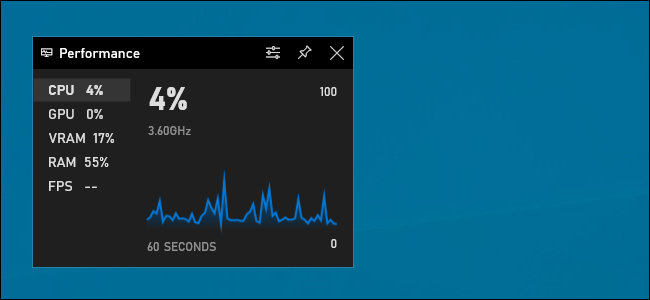
Once the widgets appear, we will have to look for the one that says “Performance”.
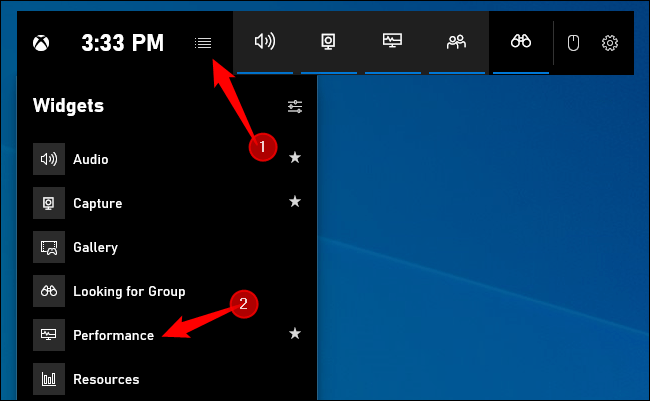
If you don’t see the floating performance dashboard, you’ll need to click the menu button at the top of the screen. Among the options that appear, we will select the one that says “Performance”.
We return to the floating performance window and we will have to click on the option that says “FPS”. The first time you click this option. A message will appear requesting extended access to User Account Control to get all the information about the games on the PC.
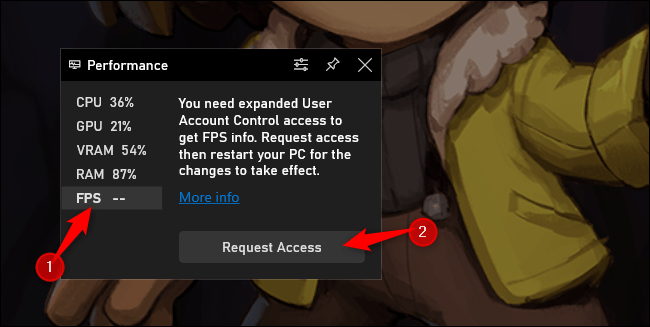
So what we’re going to do is click “Request access” and you’ll be asked to accept a User Account Control message. After confirming the message, you will need to restart your computer to activate this feature. Once you reboot, you won’t have to start over.
Once you restart the computer we will have to open any video game and then the Xbox game bar by pressing “Control + G”. Now you can see that the performance widget is showing us frames per second (FPS), just for other information like CPU, GPU, VRAM and RAM usage.
If you want to keep the widget to see the FPS of any game on Windows. All you have to do is click on “Pin” located at the top of the window, just to the left of the “X” to close it.
Share this with your friends!

Toni Morrison was a celebrated American author whose novels earned worldwide recognition for their depth, artistry, and cultural significance. Her influential works continue to inspire readers and writers across generations.