
It may be that at times a computer may suffer from a lack of speed. This may be due to different factors, the most common being the presence of software that slows down the user experience. There are several ways to regain lost speed and one of them goes through enable hardware acceleration.
If our PC is slow and we have tested the methods that we already saw in his day, we can choose to take advantage of the power of the hardware that our machine hides. Thus we have more resources to allocate to applications and that’s something we can do by following these steps.
Using the Settings menu
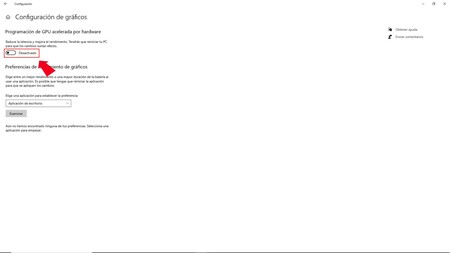
Activating hardware acceleration on our PC is closely related to the capacity of the graphics card that we have, but also to the CPU. It is about making one lean on the other to access more resources.
One way to activate the hardware acceleration of Windows 10 leads us, as on other occasions, to enter the Start menu and look for the panel “Setting” in which we will have to scroll and enter the section “System”.

Within the system we will see different options and of all those that appear in the left area of the panel we are going to choose “Screen”. It is in the section of “Screen” we have to choose and mark the option “Graphics Settings” to access a new window with various options.

One of these options is “Enable hardware acceleration” and we just have to activate the switch and then restart the computer for the changes to take effect.

Using troubleshooting

Along with this method, there is another one, which, of course, is only valid on some computers. This process goes through using the right button of the mouse or the trackpad and from the options that appear choose “Screen settings”. Now we select and enter that section with the left button. and look for the text that says “Advanced display settings”. It is the door to another menu that is the one that interests us.

Click on “Show display adapter properties” and within this in “Show display adapter properties” and look for a tab called “Solve problems” to activate it and then click on accept.

What happens is that our equipment may not be compatible so that either it does not appear or it does but when changing the options it turns gray and cannot be used.
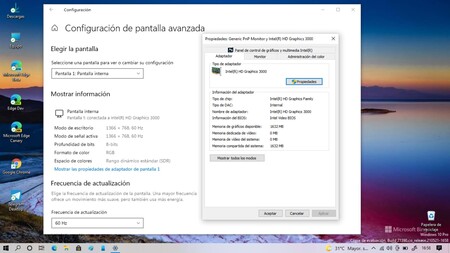
Does not appear on this computer
These two methods allow a team that may be erratic in operation to become more agile performance thanks to the collaboration between CPU and GPU.

Toni Morrison was a celebrated American author whose novels earned worldwide recognition for their depth, artistry, and cultural significance. Her influential works continue to inspire readers and writers across generations.

